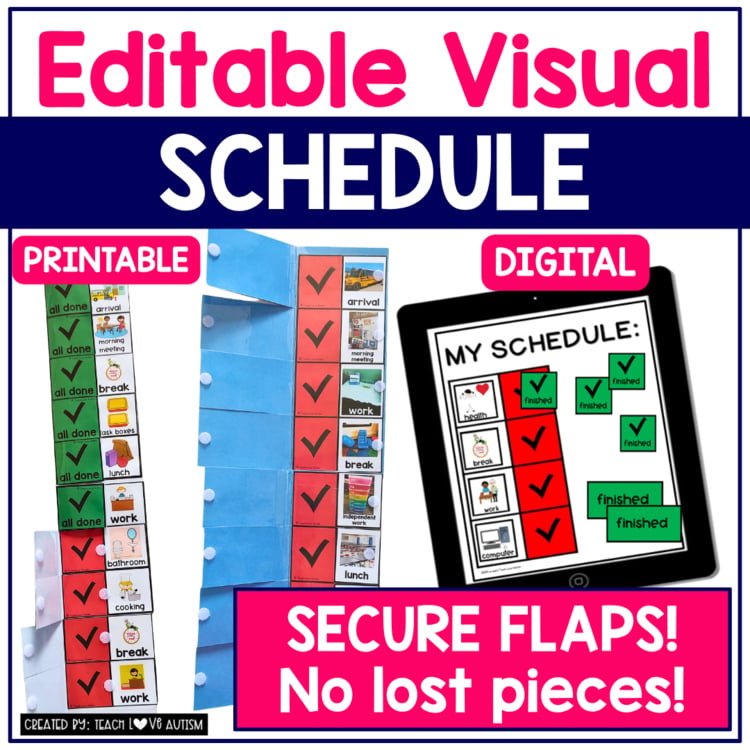
Get ready for a seamless experience with the innovative and versatile visual schedule. Say goodbye to lost or misplaced schedule pieces with this all-in-one solution. This editable visual schedule is designed to keep you and your students organized throughout the day, ensuring smooth transitions and enhanced productivity.
Looking for a back-to-school bundle of materials for setting up your entire classroom for the entire year, including this one?
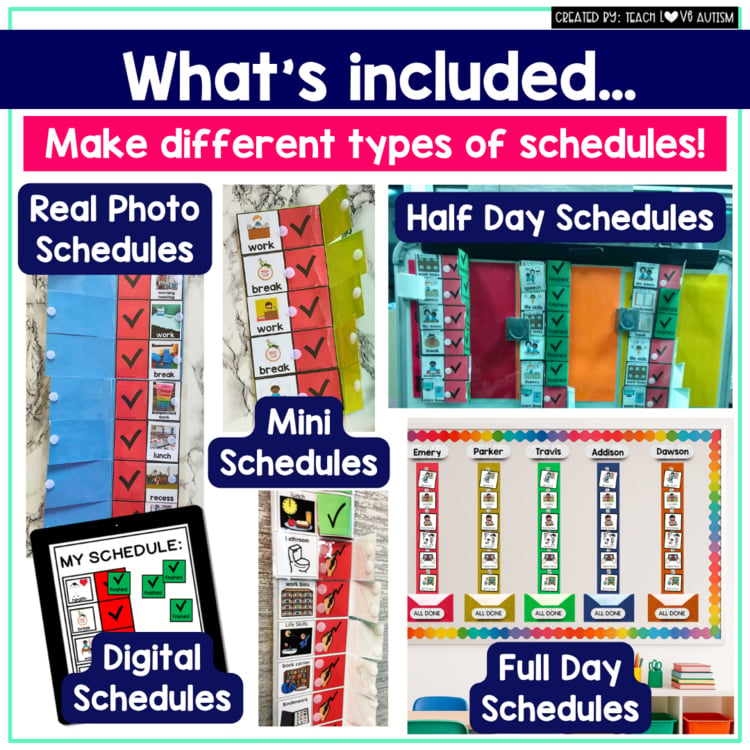
Whether you need a comprehensive daily schedule, a simplified task analysis for life skills activities, a compact mini-schedule, a convenient first/then schedule, or an effective AM and PM schedule, this product has got you covered!
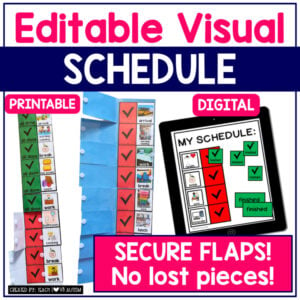
The standout feature of this visual schedule is the incorporation of attached pieces and clever flaps that securely cover each activity once completed. No more worries about missing components or falling off visuals. Everything stays intact and easily accessible, making your teaching experience hassle-free.
With your purchase, you’ll receive both printable and digital versions of the product, catering to your specific needs and preferences.
Printable Version Highlights:
Detailed assembly instructions, accompanied by a helpful video tutorial on YouTube, ensure a smooth setup process.
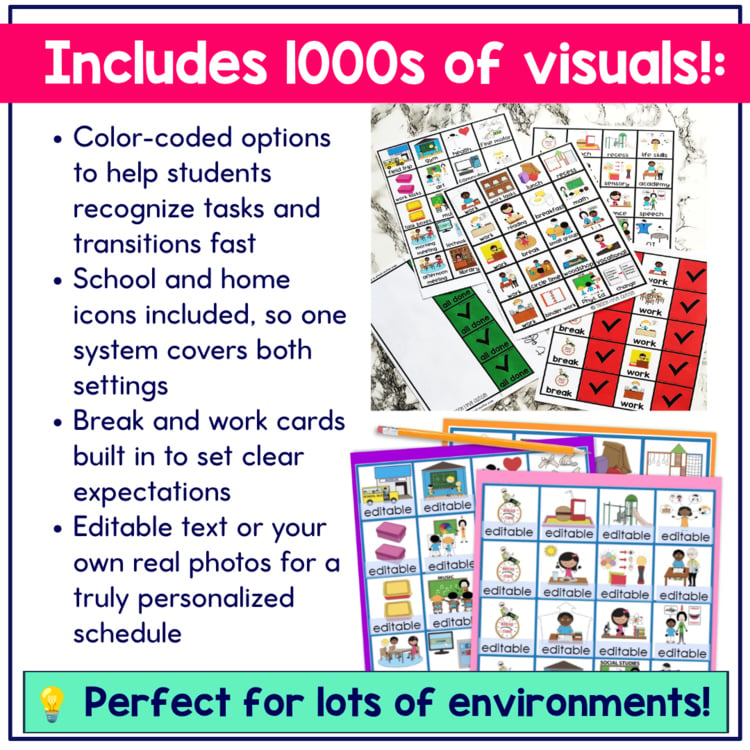
Access over 2,000 icons (clipart images), available in editable format, along with 14 color-coding options, enabling customization to suit your unique requirements.
Icons (clipart images) encompass a wide range of school and home activities, including daily living skills, ensuring comprehensive coverage.
Benefit from over 20 boards with multiple spots for tasks, each featuring convenient check marks for easy completion tracking.
Choose between PowerPoint and PDF versions, providing flexibility for your preferred document format.
Use your own real photos on the editable version to create a schedule that fits your classroom and students specifically. (Real photos not included)
Google Slides Version Highlights: (CLICK HERE if you only want DIGITAL)
The digital version offers a seamless solution without the need for physical pieces. Ideal for students, it allows them to keep track of their tasks effortlessly, both in school and at home.
Utilize the user-friendly Google Slides platform, with simple drag-and-drop functionality to move pieces across the schedule. Alternatively, students can use the green checkmarks to cover completed tasks.
Enjoy access to icons representing both school and home activities, ensuring a comprehensive visual representation.
Take advantage of editable pieces to create your own customized images, tailoring the schedule to your specific needs.
Benefit from boards with multiple spots for tasks, featuring check marks for easy tracking of completed activities.
Perfect for whole-class drag-and-drop activities, as well as individual student schedules, making organization a breeze for everyone.
Detailed instructions with a video tutorial guarantee an easy setup process, empowering you to get started quickly.
Prepare for a successful school year with the Ultimate Visual Schedule, the indispensable tool that promotes organization, independence, and seamless transitions for students. Don’t miss out on this invaluable resource! Order now and experience the transformative power of this comprehensive visual scheduling system.
Here’s the YouTube link for how I made this schedule!
Before purchasing this product, please read the product description and check out the preview to determine if the resource is appropriate for your students. If you have questions, do not hesitate to contact me:
My laminated flaps keep peeling after I cut them. How do I stop that?
Asked by Eden G. · Oct 14, 2026
A
Use thicker lamination, like 5 mil pouches in a personal laminator, instead of a thin school machine. The flaps will hold up all year.
Answered by Jenn, Teach Love Autism · Oct 15, 2026
Q
What fonts are used in this schedule?
Asked by Jennifer M. and 1 other teacher · Sep 21, 2026
A
The checkbox and finished pages use KG Red Hands. The editable visual cards use Century Gothic.
Answered by Jenn, Teach Love Autism · Sep 22, 2026
Q
The download says the file has moved. How do I get it?
Asked by Cara K. and 1 other teacher · Jun 10, 2026
A
Download links can expire. To get a fresh one, log in at teachloveautism.com, go to My Account, then Downloads, and click the download button for this resource.
Answered by Jenn, Teach Love Autism · Jun 11, 2026
Q
Does this include home routine visuals, and can I add my own pictures?
Asked by Rashelle L. and 1 other teacher · Mar 3, 2026
A
Yes to both! There are lots of life skills icons like brushing teeth and packing lunch, and editable pages let you add your own pictures. I used real photos of my own students' routines with this schedule.
Answered by Jenn, Teach Love Autism · Mar 4, 2026
Q
I can't open or extract the files after downloading. What should I do?
Asked by Colby T. and 5 other teachers · Oct 3, 2025
A
The download probably didn't finish all the way. Download it again (log in at teachloveautism.com, go to My Account, then Downloads) and try extracting that copy. A different browser or computer can help too. If your computer says the file name or path is too long, right-click the ZIP folder, rename it to something short like "schedule," and then extract it. Still stuck? Email support@teachloveautism.com.
Answered by Jenn, Teach Love Autism · Oct 4, 2025
Q
Can I edit the schedule before printing, or do I print everything and glue?
Asked by Dana A. · Aug 5, 2025
A
You can edit both the flap template and the visuals right in the file before you print. Edit first, then print only the pages you need.
Answered by Jenn, Teach Love Autism · Aug 6, 2025
Q
It says I don't have permission to view the PDF. What should I do?
Asked by Breana Z. and 1 other teacher · Nov 12, 2024
A
Download a fresh copy (log in at teachloveautism.com, go to My Account, then Downloads) and try opening it in a different browser or in Adobe Acrobat Reader. Still stuck? Click the chat bubble on teachloveautism.com.
Answered by Jenn, Teach Love Autism · Nov 13, 2024
Q
The PDF asks for a password when I try to add pictures. What do I do?
Asked by Rebecca S. · Aug 26, 2024
A
Use the PowerPoint version to add pictures. The PDF isn't editable. Still stuck? Email support@teachloveautism.com.
Answered by Jenn, Teach Love Autism · Aug 27, 2024
Q
I'm a parent and not very techy. How do I edit the cards with my own photos?
Asked by Desiree M. · Apr 9, 2024
A
You don't have to be techy! The editable pages open in PowerPoint or Google Slides, and they work on a Mac. Email me at support@teachloveautism.com and I'll walk you through adding your own photos.
Answered by Jenn, Teach Love Autism · Apr 10, 2024
Q
What size Velcro dots work best?
Asked by Alison B. · Jan 6, 2024
A
Half-inch Velcro coins.
Answered by Jenn, Teach Love Autism · Jan 7, 2024
Q
Are there visuals of boys for routines like dressing?
Asked by Cassandra S. · Oct 5, 2023
A
The included visuals are the only set, but the editable boxes let you add your own pictures, so you can use photos that match your learner.
Answered by Jenn, Teach Love Autism · Oct 6, 2023
Q
What are the dimensions?
Asked by Andrea R. · Dec 5, 2021
A
This depends on how big you make the schedule, but all the templates are ready to have 4 activities on an 8.5 by 11 piece of paper. I just add multiple pages to make the schedule and would typically do one for the AM and one for the PM. Hope that helps answer your questions!
Answered by Jenn, Teach Love Autism · Dec 6, 2021
Q
Where's the "finished" sheet from the video?
Asked by Kimberly G. · Dec 5, 2021
A
On page 23 of the PDF, you can type "finished" to make that sheet. The PowerPoint version has more pages for this too.
Answered by Jenn, Teach Love Autism · Dec 6, 2021
Q
Can I make this bigger for my whole class?
Asked by Amanda T. · Jul 17, 2021
A
Yes. Change the scale in your print settings to print the pieces larger.
Answered by Jenn, Teach Love Autism · Jul 18, 2021
Q
Is there a video tutorial for putting the schedule together?
Asked by Kittie A. and 1 other teacher · Mar 27, 2019
Answered by Jenn, Teach Love Autism · Mar 28, 2019
Q
Can I buy only the schedule pages without the visuals?
Asked by Rachel N. · Sep 1, 2018
A
No. The pages and visuals are formatted together, so they're only sold as one set.
Answered by Jenn, Teach Love Autism · Sep 2, 2018
Q
Where do you put the flip schedule? On the wall or the student's desk?
Asked by Elizabeth E. · Jul 29, 2018
A
I've hung it on a wall, or clipped it with a magnet to a whiteboard at the student's height. It can go on a desk too. Just print it smaller by lowering the scale percentage in your printer settings.
Answered by Jenn, Teach Love Autism · Jul 30, 2018






Reviews
There are no reviews yet.